AI for Product Managers: How to Kill 30% of Your Weekly Workload

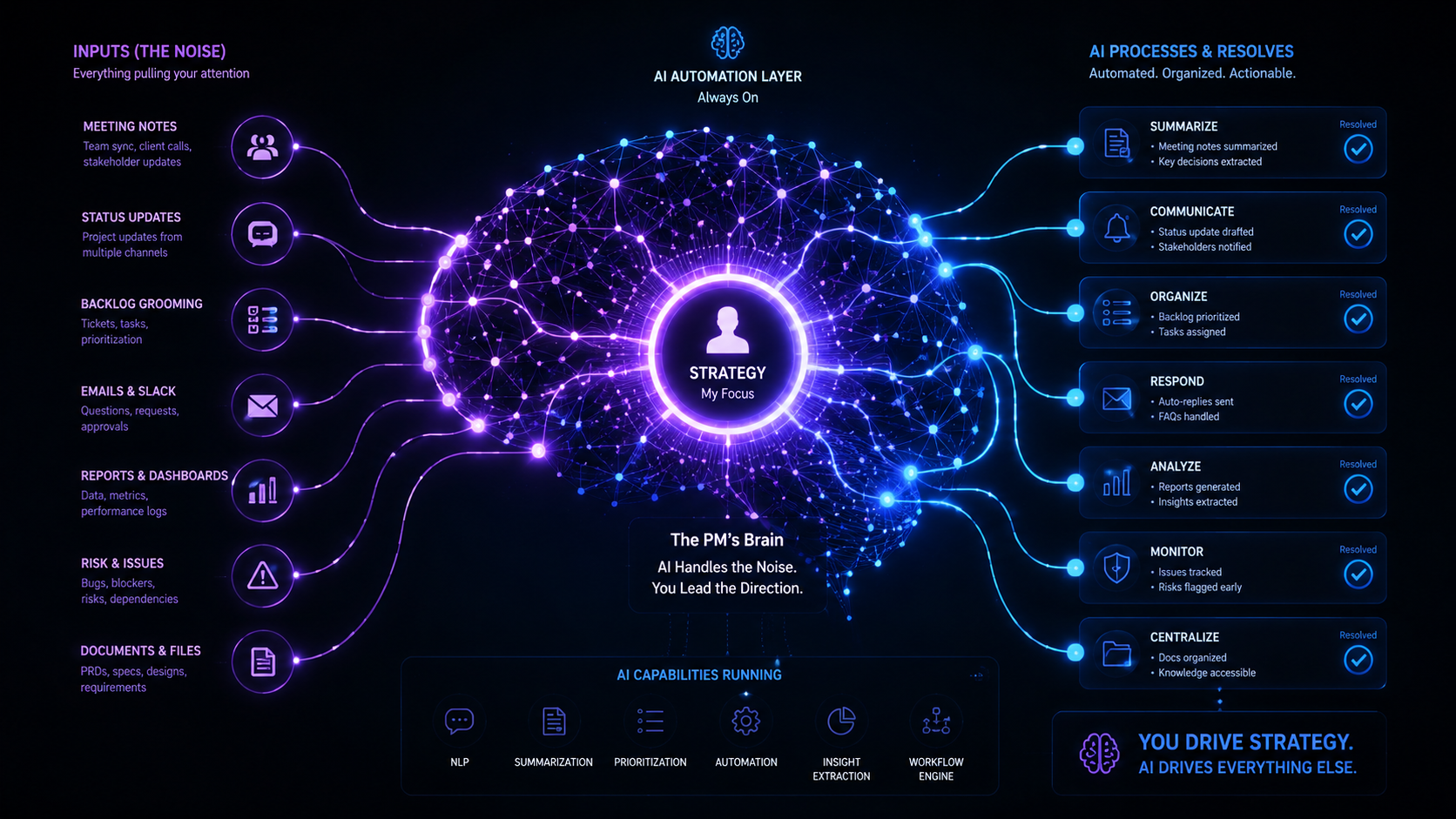
Table of Contents
- The problem is not that PMs are unproductive
- Where the weekly overhead actually comes from
- The tasks AI for product managers handles well — and the ones it does not
- Meeting notes and call summaries
- Status updates and stakeholder communication
- Backlog grooming and ticket writing
- Research synthesis and competitive intelligence
- The tools doing this work in 2026
- Common mistakes PMs make when adopting AI tools
- How to start without making it a project
- The one rule that keeps AI useful for PMs
The phrase AI for product managers usually comes attached to a list of features and a 30-day free trial. What it rarely comes with is an honest breakdown of which parts of your week are actually candidates for automation — and which ones will break if you hand them to a model without thinking first.
If you are a product manager trying to figure out where AI for product managers fits into your workflow, the answer is not “everywhere.” The answer is in the overhead layer: the administrative work that surrounds every strategic decision but contributes nothing to the quality of those decisions.
That layer is real, it compounds across a full week, and it is the most appropriate target for AI assistance right now. This post covers what that overhead looks like, where AI reliably cuts it, which tools are handling it in 2026, and how to build the habit without adding more complexity to an already loaded schedule.
The Problem Is Not That PMs Are Unproductive
Product managers are not idle. The problem is the composition of the workload — the distribution between the work that requires judgment and the work that does not. This is the core challenge that AI for product managers is positioned to solve.
A typical PM week includes customer interviews, discovery calls, internal syncs, sprint ceremonies, stakeholder reviews, design reviews, and engineering check-ins. Most of that meeting time is legitimate.
But layered on top of it is a secondary workload: writing up what was discussed, translating decisions into tickets, summarizing research, sending status updates, and preparing materials for the next round of meetings. This secondary layer does not require strategic judgment. It requires time, attention, and a consistent output format.
That is exactly the profile of work where AI for product managers performs reliably, and where the time savings compound most noticeably across a full week.
The estimate that AI can eliminate roughly 30% of a PM’s weekly overhead is a function of how much of that overhead is documentation, synthesis, and structured communication — tasks that have always been necessary but never been high-leverage uses of PM time.
Where the Weekly Overhead Actually Comes From
Before deciding what to hand to AI, it helps to name the tasks consuming disproportionate time relative to the value they add:
- Post-meeting write-ups. Most discovery calls, sprint retros, and stakeholder syncs require a written summary. Without automation, that is 15–30 minutes per meeting, often done at the end of a day when attention is already depleted.
- Status updates. Weekly or bi-weekly stakeholder updates require pulling progress data, synthesizing recent decisions, and writing something coherent. For PMs running two or more workstreams, this is a recurring drain every week.
- Ticket writing and backlog grooming. Translating a conversation, a customer complaint, or a design decision into a properly structured ticket with context, acceptance criteria, and dependencies is time-consuming — and largely formulaic once you know the pattern.
- Research synthesis. Customer interviews, competitive analysis, and user feedback accumulate in raw form. Turning that material into structured insight takes hours of manual review that can be significantly compressed with the right AI tooling.
- First-draft documentation. PRDs, one-pagers, and meeting briefs all have repeatable structures. Writing first drafts from scratch is slower than reviewing and editing an AI-generated draft that already follows the right format.
These tasks are not trivial — they are genuinely necessary. But they are tasks a PM can oversee and validate rather than originate from scratch. That distinction is where AI for product managers creates the most consistent leverage. The goal of AI for product managers is not to replace judgment — it is to eliminate the overhead that surrounds it.
The Tasks AI for Product Managers Handles Well — and the Ones It Does Not
The most important thing a PM can understand about AI assistance is where the line sits between execution and judgment. Using AI for product managers effectively starts with knowing exactly where that line is.
| Task | AI Handles Well | Still Requires PM Judgment |
|---|---|---|
| Meeting notes | Transcription, summary, action item extraction | Deciding what was actually decided |
| Status updates | Drafting from existing data | Framing risks and context stakeholders need |
| Ticket writing | Structuring, formatting, first drafts | Scoping, prioritization, acceptance criteria edge cases |
| Research synthesis | Clustering themes, identifying patterns in transcripts | Weighing which signals matter strategically |
| PRD drafting | Structure, format, first-draft language | The actual product decisions inside the document |
| Competitive research | Summarizing sources, compiling feature comparisons | Interpreting what it means for your roadmap |
| Prioritization | Presenting frameworks, formatting scoring matrices | The prioritization decision itself |
The risk of misusing AI for product managers is not laziness — it is misclassification. Handing a judgment call to AI and treating the output as a decision is more expensive than doing it manually in the first place.
AI for Product Managers: Meeting Notes and Call Summaries
This is the highest-frequency, lowest-leverage task in most PM schedules. A PM running six to eight meetings a week who is still writing up notes manually is spending two to four hours a week on a task that is almost entirely automatable today.
The current standard for AI for product managers meeting capture is tools that record and transcribe calls without inserting a visible bot that changes how participants behave.
Granola operates this way — it captures audio locally on Mac and uses your own notes as scaffolding, rather than producing a generic AI summary of a raw transcript. For customer interviews in particular, the quality difference matters: participants who know they are being recorded by a third-party tool sometimes self-censor in ways that affect the quality of discovery data.
For internal calls where a bot presence is acceptable, Fireflies and Fathom both integrate with Slack, Notion, and Linear to push summaries and action items automatically after each meeting. The integration matters more than the transcription — a summary that requires manual filing is only half the time savings.
A useful target: if a 45-minute discovery call is currently taking you 30 minutes to summarize and file, the right tooling should compress that to under five minutes of review and light editing. That compounds fast across a full week.
Status Updates and Stakeholder Communication
Status updates are one of the most consistent sources of AI misuse among PMs — not because the task is wrong to automate, but because the automation is applied without enough input context.
An AI-generated status update drafted from a project tracker or sprint board will look well-structured and complete. It will surface risks, list progress, and format next steps cleanly.
What it will not know is the context that matters to your specific stakeholders: the concern raised informally in a Slack message, the decision that was walked back before it made it into any ticket, the dependency at risk because of a conversation that happened off-channel.
The right workflow for AI for product managers here is to use AI to draft the structure of the update — pulling from available data — and then review it specifically for what is missing rather than what is wrong. Before sending any AI-generated status update, ask three questions:
- What changed since the last update that is not captured in the project data?
- Which risk or dependency might be misread without the context I have from recent conversations?
- What does this audience need to decide or unblock after reading this?
Answering those three questions takes five minutes. Skipping them and sending the AI draft as-is is where status updates start generating unnecessary follow-up meetings.
The ProductPlan guide on PM status updates captures this tension well: the goal is not a polished document but a communication that moves stakeholders toward a decision or action.
Backlog Grooming and Ticket Writing
Writing a well-structured ticket from a vague input — a customer complaint, a Slack thread, a quick design decision — is one of the most repeatable tasks in product management. It has a consistent format, a clear set of required fields, and a predictable output.
This is one of the clearest wins for AI for product managers in day-to-day work. The workflow that works: capture the input in whatever form it arrives, paste it into Claude or ChatGPT with a prompt that specifies your ticket format, and review the output for completeness.
The draft will almost always have the structure right. The review should focus on whether the acceptance criteria reflect the actual intent and whether the scope is correctly bounded.
Notion AI adds a further layer for teams that manage their backlog inside Notion — it can pull existing context from linked documents and surface related tickets, reducing the chance of writing a ticket for work already scoped elsewhere.
For teams using Linear or Jira, both platforms have added AI features for ticket auto-completion and backlog triage. Linear’s AI triage in particular has received strong feedback from teams that run high-volume backlogs and need to classify and route incoming items without manual review of each one.
Research Synthesis and Competitive Intelligence
Most PMs are sitting on more raw material than they can process. Customer interview transcripts, feature request logs, NPS comments, competitive announcements, and analyst notes accumulate faster than any single person can synthesize into actionable insight.
For AI for product managers, research synthesis is where the time savings are often the most dramatic. Feeding a batch of interview transcripts into NotebookLM or Claude with a prompt asking for recurring themes, representative quotes, and signal-to-noise patterns compresses hours of manual review into minutes.
The output is a starting point, not a final analysis — but a good starting point changes how fast you can move from raw data to a testable hypothesis.
For competitive intelligence, Perplexity AI has become a practical tool for AI for product managers research workflows — PMs who need cited, current summaries of competitor moves without the noise of a general web search. It is faster than reading through five tabs of search results and more trustworthy than an AI model summarizing from training data with no source attribution.
The ceiling here is interpretation. AI can tell you that six out of ten interview participants mentioned onboarding friction. It cannot tell you whether that friction is a product gap, a documentation gap, or a sales misalignment problem. That judgment is still yours.
The Tools Doing This Work in 2026
A practical breakdown of which tools are handling each use case for AI for product managers right now. Most PMs running a lean stack find that two or three of these tools cover 80% of the overhead reduction available through AI for product managers today:
| Use Case | Tool | Why It Works for PMs |
|---|---|---|
| Meeting notes (external calls) | Granola | Bot-free capture, high-quality summaries, works with your own notes |
| Meeting notes (internal calls) | Fireflies / Fathom | CRM and project tool integrations, automated action item routing |
| Status updates and PRD drafts | Notion AI / Claude | Drafts from existing context; Notion AI keeps everything in one workspace |
| Research synthesis | NotebookLM / Claude | Handles large input volumes, surfaces themes across multiple documents |
| Competitive intelligence | Perplexity AI | Cited, current results without hallucinated product details |
| Backlog and ticket writing | Linear AI / Notion AI / Claude | Structured output, integrates with existing PM workflows |
None of these tools require significant setup time. Most of the time savings from using AI for product managers tools appear in the first week of consistent use. The barrier to starting with AI for product managers has never been lower — the barrier is building the right habits around it.
Common Mistakes PMs Make When Adopting AI Tools
Most AI for product managers adoption failures are not tool failures. They are workflow design failures. Understanding the common mistakes before you start saves the frustration of discovering them after two weeks of inconsistent results.
Using AI for prioritization before you have a clear framework. AI can format a prioritization matrix and populate it with your backlog items. It cannot decide what your product strategy is or which customer segment matters most right now. Define your prioritization criteria first, then use AI to apply them at scale.
Sending AI-generated content without a context review pass. AI drafts from the data it has. It has no access to the informal context that lives in your head — the hallway conversation, the Slack DM, the verbal agreement that was never written down. A five-minute review pass before sending any AI-generated communication is non-negotiable.
Switching tools too quickly. The PM who tries Granola for two days, switches to Fathom for a week, and then experiments with Otter.ai never builds the workflow habit for any of them. Pick one tool per use case, use it consistently for at least four weeks, and only switch if the output quality is genuinely insufficient.
Skipping the prompt calibration phase. The first few outputs from any AI for product managers tool for a new task type will be suboptimal. That is normal. Refine the prompt — add more context, specify the format, include an example of what good looks like. The compounding returns come from a well-calibrated prompt used repeatedly.
How to Start Without Making It a Project
The most common reason PMs adopt AI for product managers slowly is that it feels like another project on top of an already full schedule. It does not have to be.
Pick one task from your current week that is purely administrative — writing up notes from a call you already had, drafting a status update from tickets that are already closed, or writing a ticket from a conversation that already happened. Do that one task using AI for product managers tooling.
Use Claude or ChatGPT in a browser tab with a prompt that describes your format and the raw input you have. If it saves 15 minutes, that is your proof of concept. Add one more task the following week.
After a month of this, the overhead reduction is significant and the behavior is already a habit rather than a workflow change you have to maintain consciously. You can also see how agent workflows are reshaping how software teams operate beyond individual PM tasks — the shift is broader than any single role.
The One Rule That Keeps AI Useful for PMs
Every PM using AI for product managers effectively holds one rule clearly: AI drafts, you decide.
Meeting notes — AI drafts, you verify that the decisions recorded are accurate. Status updates — AI drafts, you add the context that was not in the data. Tickets — AI drafts, you confirm the scope and acceptance criteria reflect the actual intent. Research synthesis — AI clusters, you interpret what it means strategically.
The value of AI for product managers is not that it makes decisions for you. It is that it removes the formatting and assembly work between the input and the output — so the only time you are spending is on the parts that actually require your judgment.
That is where the 30% comes from. Not from AI for product managers replacing PM work, but from AI absorbing the layer of work that was never strategic in the first place.
The next practical step is to open your calendar for last week, identify the two meetings whose follow-up took you the longest to write up, and use one of the tools above to handle that task this week. One week of the right habit is enough to tell whether the time savings are real for your specific workflow. For a deeper look at how to evaluate which AI tools actually deliver before committing, see how to evaluate AI tools without falling for the hype.