Multi-Agent Systems for Software Teams: The Proven Way to Ship Faster in 2026

Single-agent AI tools are not the bottleneck problem anymore. The teams compressing delivery cycles in 2026 are running multi-agent systems for software teams — structured pipelines where specialized agents plan, execute, review, and hand off work without a human bridging every step.
Multi-agent systems for software teams are not a research topic. They are already in production at teams of 5 to 50 people, using frameworks like LangGraph, CrewAI, and Anthropic’s multi-agent orchestration tooling. The gap between teams doing this and teams still prompting one model at a time is widening fast.
This article breaks down what multi-agent systems for software teams actually look like in production, the patterns that work, the failure modes to avoid, and what you should do this week if your team is not using them yet.
What Multi-Agent Systems Actually Are (And Are Not)
A multi-agent system is a setup where multiple AI agents operate as a coordinated team, each with a specific role, passing outputs to one another according to a defined flow. One agent plans. One executes. One reviews. One routes the result to the right output or triggers the next step.
This is different from chaining prompts in a single session. And it is very different from giving a developer a smarter autocomplete tool. Multi-agent systems for software teams require deliberate architecture: clear responsibilities, handoff contracts, and defined failure handling.
Teams that treat multi-agent systems as “just more AI” tend to build brittle pipelines that fail silently. Teams that design them like distributed systems — with the same rigor they apply to service boundaries and data contracts — get consistent, compounding results.
What multi-agent systems are not: they are not autonomous replacements for engineers. They are structured automation layers that remove low-value handoffs, compress review cycles, and parallelize work that used to be strictly sequential.
Why Single-Agent Setups Hit a Ceiling
Most teams started with single-agent AI usage: one model, one session, one task at a time. A developer asks Claude or ChatGPT to write a function. A PM asks it to draft a status update. That still has value. But it does not scale across a team’s delivery workflow.
The problems that surface as teams grow their AI usage:
- Context overload. One agent handling a 10-step workflow loses coherence. Long context windows help but do not fix the problem when the task requires specialized reasoning at each step.
- No parallelism. A single agent works sequentially. Multi-agent systems for software teams can run a code review agent, a test generator, and a documentation agent in parallel on the same pull request.
- No specialization. A general-purpose agent is mediocre at everything. A specialized reviewer agent with a focused prompt and constrained scope outperforms a generalist on that specific task every time.
- Human-in-the-loop bottlenecks. Every handoff requires a human to move the output to the next step. Multi-agent systems eliminate that friction for well-defined tasks.
The ceiling is not the model’s intelligence. It is the architecture around it.
The Three-Layer Pattern Most Teams Use
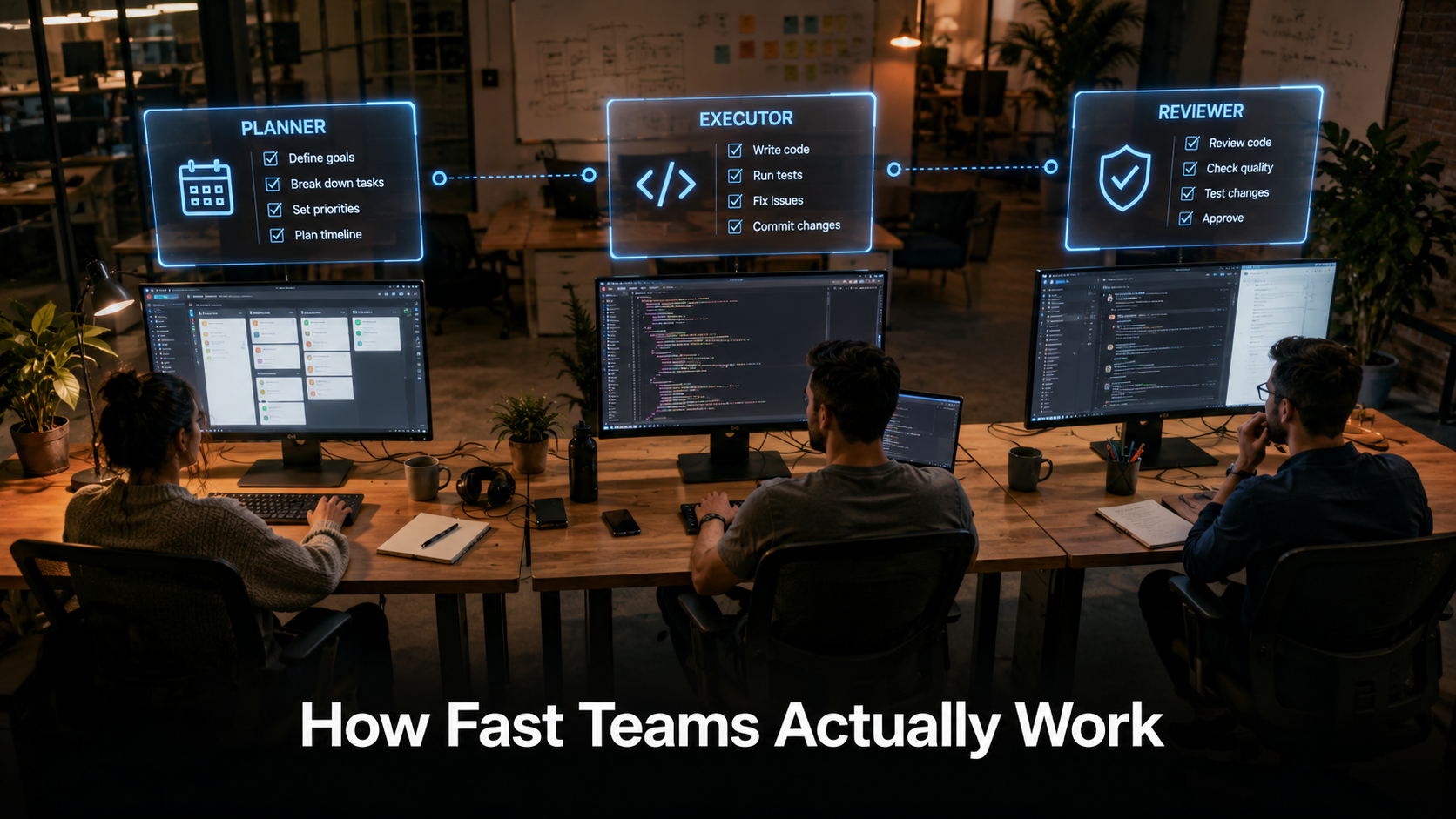
The most durable multi-agent architecture for software teams is a three-layer model: Planner → Executor → Reviewer. Each layer is a distinct agent with a distinct prompt, a constrained scope, and a defined output contract.
| Layer | Role | What It Produces | Who Triggers It |
|---|---|---|---|
| Planner Agent | Breaks down the task, defines subtasks, sets constraints | Structured task list or JSON plan | Human or orchestrator |
| Executor Agent | Implements each subtask within the defined scope | Code, content, data, or structured output | Planner output |
| Reviewer Agent | Evaluates output against acceptance criteria | Pass/fail with reasons, revision requests | Executor output |
This pattern maps cleanly onto how software teams already think about work. The Planner agent is the equivalent of a tech lead breaking down a ticket. The Executor agent is the developer doing the implementation. The Reviewer agent is the code review step. The difference is that the first two layers can run without human input, and the Reviewer surfaces only the decisions that genuinely need a human call.
Some teams add a fourth layer: a Router agent that decides which specialized executor to call based on task type — one executor for backend code, one for frontend, one for documentation. This is common in multi-agent systems for software teams that handle multiple technology domains with one shared pipeline.
Real Use Cases Inside Software Teams in 2026
These are patterns that production teams are running today, not theoretical applications:
Pull Request Review Pipelines
A PR is opened. A multi-agent system triggers automatically. The first agent reads the diff and generates a summary of what changed and why. The second agent checks for common security issues, deprecated patterns, and test coverage gaps. The third agent writes inline suggestions formatted for GitHub. The human reviewer sees a pre-analyzed PR with flagged issues, not a blank diff. Review time drops significantly and fewer issues reach production.
Feature Specification to Implementation Handoff
A PM writes a feature spec in Notion or Confluence. A Planner agent reads the spec and outputs a structured breakdown: affected components, suggested implementation approach, acceptance criteria mapped to test cases, and open questions that need clarification. The engineering lead reviews the breakdown in 10 minutes instead of spending 45 minutes interpreting the spec. The Executor agent then generates starter code for each component. The human engineer validates and builds on it rather than starting from a blank file.
Automated QA and Test Generation
When new code is merged, an Executor agent generates unit tests for uncovered functions. A Reviewer agent evaluates whether the tests cover edge cases. A documentation agent updates the relevant README section. All three run in parallel. The engineer reviews the outputs in a single session instead of doing each step manually across multiple tool windows.
Sprint Preparation Workflow
Before sprint planning, a Planner agent reads the backlog, identifies tickets that lack acceptance criteria or clear scope, and flags them. A second agent drafts missing acceptance criteria based on existing patterns in the codebase and prior tickets. A third agent estimates complexity ranges based on historical sprint data. The PM goes into sprint planning with a pre-groomed, flagged backlog instead of discovering ambiguous tickets mid-meeting.
How CustomGPT.ai Fits Into a Multi-Agent Stack
One of the persistent problems in multi-agent systems for software teams is institutional knowledge. An Executor agent writing code or drafting a spec has no access to your team’s internal decisions, your product context, or the reasoning behind past architectural choices — unless you explicitly feed that context into it every time.
This is where CustomGPT.ai plugs a real gap. CustomGPT.ai lets you build a custom AI agent trained on your team’s actual documentation — internal wikis, Confluence pages, Notion docs, past PRDs, and architecture decision records. That agent becomes the knowledge layer in your multi-agent pipeline: a specialized retrieval agent that answers context-specific questions before the Executor begins work.
Instead of an Executor agent working from a generic prompt, it first queries your CustomGPT.ai agent for relevant internal context — how does this team handle authentication? What is the agreed naming convention for this service? What did the last PRD say about this feature area? — and uses that grounded context to produce output that fits your team’s actual codebase and decisions, not just general best practices.
For teams building multi-agent systems for the first time, a CustomGPT.ai knowledge agent is one of the lowest-friction ways to add team-specific intelligence to the pipeline without building a retrieval system from scratch. You ingest your existing documentation, configure the agent’s scope, and connect it to your orchestration layer via API.
Multi-Agent vs. Single-Agent: A Direct Comparison
| Dimension | Single-Agent | Multi-Agent System |
|---|---|---|
| Task scope | One task per session | Full workflow across multiple tasks |
| Parallelism | Sequential only | Parallel execution across agents |
| Specialization | General-purpose, broad prompts | Specialized agents with constrained scope |
| Human input required | Every step | Only at decision points and review |
| Team knowledge access | Only what’s in the prompt | Retrieval agents (e.g. CustomGPT.ai) feed context |
| Error surface | Errors caught by the human | Errors caught by the Reviewer agent first |
| Setup complexity | Low | Medium to high |
| ROI at scale | Limited | High as workflow volume grows |
The setup cost is real. Multi-agent systems for software teams require more upfront design, more prompt engineering, and more orchestration logic. Teams that ship the biggest gains are the ones that invested two to four weeks in design before expecting returns.
The Failure Modes No One Talks About
- Silent drift. An Executor agent produces output that is technically valid but misaligned with the original intent. Without a well-prompted Reviewer agent, this drifts undetected across multiple cycles until a human catches a downstream problem.
- Prompt bleeding. When agents share context across sessions improperly, one agent’s assumptions contaminate another’s reasoning. Each agent in multi-agent systems for software teams needs a clean, isolated context window with only the inputs it needs.
- Over-automation of judgment calls. Multi-agent systems work for well-defined tasks. Teams that automate ambiguous decisions — architecture choices, scope trade-offs, user-facing copy tone — get confident-sounding wrong outputs that take time to identify and correct.
- No fallback for failure. If an agent in the middle of a pipeline fails or produces unusable output, a pipeline with no fallback logic stalls silently. Every production multi-agent system needs defined failure states and human escalation paths.
- Ignoring latency costs. Running three agents in sequence has latency costs. For workflows that need real-time results, parallelism matters more than sequential depth. Design for your latency requirements, not just accuracy.
How to Start Without Rebuilding Your Entire Stack
The teams that fail at building multi-agent systems for software teams try to automate too much too fast. The teams that succeed start with one high-friction, well-understood workflow and build from there.
- Pick one workflow with a clear input and a clear expected output. PR review, ticket grooming, or test generation are good starting points. Avoid workflows where success criteria are subjective.
- Map the existing human steps. Write down every step a human currently takes in that workflow. Each step is a candidate for agent replacement or agent assistance.
- Build the Reviewer agent first. Counter-intuitive but effective. Building the agent that evaluates output quality forces you to define what “good” looks like before you build the agent that produces it.
- Add a knowledge layer. If your team has internal documentation, connect a retrieval agent like CustomGPT.ai before the Executor runs. Context-grounded output is consistently more useful than generic output.
- Use an orchestration framework. LangGraph, CrewAI, and Anthropic’s multi-agent tooling all provide the scaffolding you need. Do not build orchestration from scratch for your first system.
- Run the human workflow and the agent pipeline in parallel for two weeks. Compare outputs. Identify where the agent falls short. Tighten the prompts and the scope before removing the human step entirely.
- Expand incrementally. Once one pipeline is stable, add the adjacent step. Multi-agent systems for software teams grow best incrementally, not in one large rebuild.
What This Means for PMs and Engineering Leads
Multi-agent systems for software teams are not just an engineering architecture decision. They change what PMs and engineering leads are responsible for.
For engineering leads: the design of the agent pipeline becomes part of your technical leadership scope. Deciding what gets automated, what stays human, and how failure is handled is the same kind of decision as choosing a database or defining a service boundary. It needs the same rigor.
For PMs: your inputs to the system matter more than they did before. A vague spec produced one ambiguous ticket. In a multi-agent pipeline, a vague spec produces ambiguous outputs at every downstream step — Planner, Executor, and Reviewer — before a human catches it. Clear, structured inputs are now a higher-leverage investment than they were in a purely human workflow.
Both roles need to understand the pipeline well enough to know when to trust it and when to intervene. That is not a technical skill. It is a judgment skill built from working alongside the system over time.
The Practical Next Step
Multi-agent systems for software teams are not inevitable — they are a design choice. Teams that make that choice deliberately, starting with one workflow and building rigorously, are consistently compressing delivery cycles in ways that feel disproportionate to the effort invested.
Start with one workflow. Build the Reviewer first. Add a knowledge layer with a tool like CustomGPT.ai to ground your agents in your team’s actual context. Run it in parallel with the human process for two weeks. Then decide what to automate next.
If your team is still running every AI task one prompt at a time, the agent workflows guide for developers covers the single-agent foundation before you layer multi-agent architecture on top. For teams already past that point, the priority is pipeline design — not more tools.