AI-Powered Sprint Planning: 5 Proven Ways Agile Teams Are Cutting Planning Time in Half

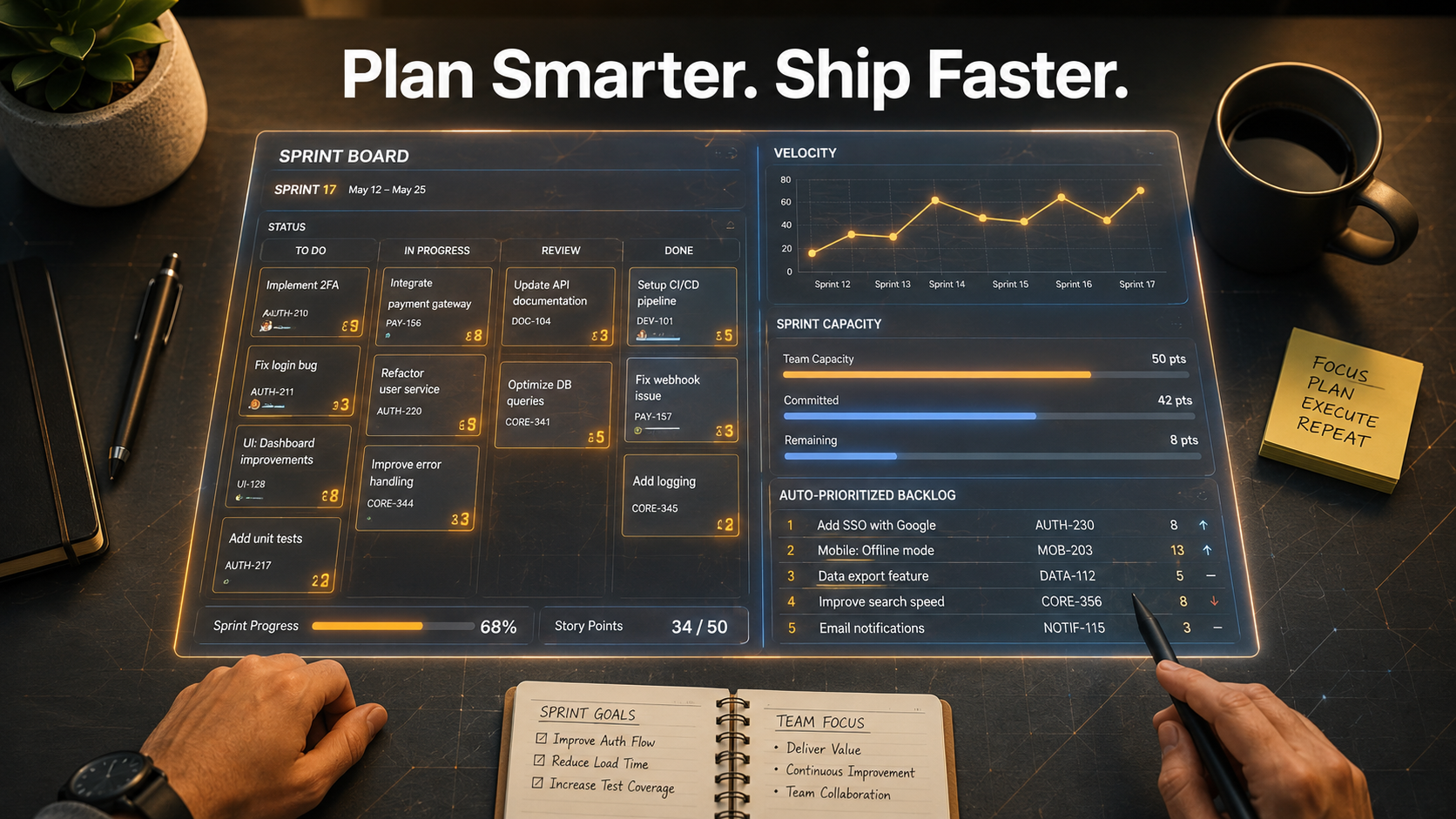
AI handles the coordination. Your team handles the decisions.
Sprint planning is supposed to set the team up for a focused two-week execution cycle. In practice, it tends to consume two to three hours of your sharpest people debating ticket estimates, chasing missing context, and negotiating scope with incomplete velocity data. By the time the meeting ends, the team is already behind.
AI-powered sprint planning does not fix your team dynamics or your product strategy. What it does is compress the low-value coordination work that inflates sprint planning sessions — the kind of work that has nothing to do with strategic decisions and everything to do with information assembly. That compression is real, and for teams that get the workflow right, it is significant.
This guide breaks down where AI fits in the sprint planning process, what it can be trusted to handle, where human judgment is still required, and what the practical workflow looks like for a team starting from scratch.
Why Sprint Planning Takes Longer Than It Should
The inefficiency in sprint planning is not usually the planning itself. It is everything that should have been done before the meeting that was not.
Teams arrive at sprint planning with a backlog full of tickets that are missing acceptance criteria. Velocity data from the last sprint has not been reviewed. Capacity is estimated verbally on the spot. Nobody has cross-referenced current commitments against known dependencies. The meeting that was supposed to take forty-five minutes becomes a two-and-a-half-hour negotiation session.
This is the pattern AI-powered sprint planning is positioned to interrupt — not by running the meeting, but by doing the preparation work that makes the meeting shorter, sharper, and more focused on decisions rather than information retrieval.
The Atlassian Agile Coach defines sprint planning as a meeting where the team commits to a set of work for the sprint based on their velocity and the product owner’s priorities. The commitment part requires judgment. The velocity review, backlog organization, and capacity calculation that enable it do not.
What AI-Powered Sprint Planning Actually Does
AI-powered sprint planning refers to using AI tools — primarily language models, integrated planning assistants, and agentic workflows — to automate or accelerate the preparation and structuring work that currently consumes disproportionate time in the planning process.
In practical terms, that means:
- Pulling velocity data from the last two to four sprints and summarizing trends without a human having to compile reports manually
- Reviewing the backlog and surfacing tickets that are ready for sprint consideration — meaning they have complete descriptions, acceptance criteria, and no unresolved dependencies
- Flagging tickets that are not sprint-ready and identifying what is missing
- Drafting sprint goals based on the current roadmap context and the tickets under consideration
- Estimating relative complexity on incomplete tickets where enough context exists
- Generating a draft sprint backlog ranked by priority, effort, and dependency order
None of these outputs are final decisions. They are structured starting points that replace blank-slate discussion with review-and-adjust conversation. That shift — from assembling information live in the meeting to reviewing pre-assembled information — is where most of the time savings come from.
The Sprint Planning Tasks AI Handles Well
Understanding where AI adds reliable value in AI-powered sprint planning requires separating two types of work: information assembly and judgment calls.
Velocity Analysis and Capacity Planning
Calculating team capacity for a sprint based on historical velocity, planned leave, and known commitments is a formulaic task. AI can pull last sprint’s data, average velocity over the last three sprints, subtract known absences, and present a capacity range in seconds. What would take a Scrum Master fifteen minutes to compile manually becomes a starting input rather than a live exercise.
Backlog Grooming and Ticket Readiness Review
Reviewing a backlog of forty to sixty tickets and identifying which ones are ready for sprint consideration is time-consuming and mostly formulaic. AI can scan ticket descriptions and flag items that are missing required fields, have unresolved dependencies, or lack sufficient context for estimation. This gives teams a groomed shortlist to discuss rather than a raw list to sort through together.
First-Draft Sprint Goal Writing
Sprint goals often take longer to write than they should because the phrasing matters — it needs to be outcome-oriented, testable, and aligned with the quarterly objective. AI can draft sprint goal options based on the tickets under consideration and the roadmap context it is given. The team still selects and refines the final version, but starting from three draft options is faster than starting from a blank page.
Ticket Description Completion
Given a rough ticket summary — a Slack thread, a customer complaint, a verbal decision — AI can generate a structured ticket draft with a description, acceptance criteria template, and suggested story points. This is especially useful for backlogs that accumulate informally between sprints.
Dependency Mapping
For larger backlogs, AI can scan ticket descriptions and flag likely dependencies — tickets that cannot start until another is complete — and surface them before the planning session rather than discovering them mid-sprint.
The Tasks AI Should Not Own
The efficiency gains from AI-powered sprint planning only hold if the team is clear about where AI stops and human judgment begins.
Sprint Commitment Decisions
What the team commits to in a sprint is a judgment call that involves factors AI does not have access to: team morale, unstated technical debt risk, informal stakeholder pressure, and the real status of in-progress work that is not reflected in the ticket system. AI can present a recommended draft sprint based on capacity and priority. The actual commitment is the team’s.
Estimation on Novel or Ambiguous Tickets
AI estimation works when there is sufficient historical context or enough ticket detail to make a reasonable inference. For genuinely new, complex, or cross-functional work where the team does not yet understand the scope, human estimation through discussion is still more reliable. Use AI estimates as a sanity check, not a source of truth.
Risk Identification Beyond Ticket Data
Some of the most important risks in a sprint are not in any ticket: the external vendor dependency that has been verbal for three weeks, the developer who is context-switching onto another team’s incident, the design handoff that has not happened yet. AI cannot surface risks that were never written down. That identification still requires the Scrum Master and team to bring the informal context that lives outside the system.
AI-Powered Sprint Planning vs. Traditional Planning: A Direct Comparison
| Planning Element | Traditional Approach | AI-Powered Approach |
|---|---|---|
| Velocity review | Manual report compilation in the meeting | Pre-session summary from historical data |
| Backlog grooming | Live review of all tickets together | Pre-groomed shortlist, flagged and ranked |
| Capacity calculation | Verbal estimation on the spot | Automated from calendar and velocity data |
| Sprint goal drafting | Written from scratch in the meeting | AI draft options reviewed and selected |
| Ticket completion | Discussed and written during planning | AI first drafts, human review and approval |
| Dependency mapping | Discovered mid-sprint or missed entirely | Flagged before the planning session |
| Commitment decision | Team discussion | Team discussion (unchanged) |
| Meeting length | 2–3 hours typical | 45–75 minutes with good preparation |
How to Build an AI-Assisted Sprint Planning Workflow
The workflow below assumes a two-week sprint cycle and a backlog managed in a tool like Jira, Linear, or ClickUp. The AI layer sits between the end of one sprint and the start of the next planning session.
Three Days Before Planning
Run AI-assisted backlog review. Feed your AI tool access to the current backlog and ask it to flag tickets that are sprint-ready versus tickets that need additional detail before they can be considered. Review the flagged items and resolve the gaps — add missing acceptance criteria, close dependencies, or defer tickets that are not ready.
Two Days Before Planning
Pull velocity data from the last three sprints. Ask AI to summarize velocity trends, identify any anomalies — spikes, drops, incomplete sprints — and calculate a realistic capacity range for the upcoming sprint based on team size and known absences. This becomes the capacity anchor for the planning session.
One Day Before Planning
Ask AI to draft a ranked sprint backlog based on the ready tickets, capacity estimate, and current roadmap priorities. Include a draft sprint goal with two or three options. Share this with the product owner and tech lead for async review before the meeting.
During the Planning Session
Start from the pre-built draft instead of a blank board. The team’s job is to review the AI-prepared starting point, adjust priorities based on context the AI did not have, finalize the sprint goal, confirm commitments, and close any remaining gaps. The meeting becomes a decision session, not an assembly session.
After the Sprint
Feed the sprint outcome back into your AI workflow. Which items were completed, which were carried over, and where were the estimates off? This feedback loop improves the quality of AI-generated estimates and readiness flags over time.
Common Mistakes Agile Teams Make When Adding AI to Sprint Planning
Treating AI Output as Final
AI-generated sprint goals, backlog rankings, and capacity estimates are drafts and starting points. Teams that approve AI outputs without review lose the context-sensitivity that makes sprint planning valuable. Build a review step into every AI output before it influences a commitment.
Skipping the Feedback Loop
AI-assisted planning improves when it learns from sprint outcomes. If the team does not close the loop — what was completed, what slipped, what was estimated poorly — the AI layer stays generic. The feedback loop is what moves AI-powered sprint planning from useful to genuinely precise over time.
Using AI to Replace Pre-Planning Discipline
AI can structure a disorganized backlog, but it cannot create good tickets out of vague inputs indefinitely. Teams that use AI to compensate for poor backlog hygiene will eventually hit the ceiling of what the AI can do with bad data. AI works best as an accelerator on top of a reasonably maintained backlog, not as a substitute for maintaining it.
Running the Same Long Meeting With an AI-Generated Agenda
The point of AI-powered sprint planning is to reduce meeting time by moving preparation work out of the meeting. If your team generates a draft agenda with AI and then runs the same three-hour session, the AI layer is not changing the structure — just the inputs. Change the meeting format alongside changing the preparation workflow.
The One Rule That Keeps AI Useful in Sprint Planning
AI prepares. The team decides.
Velocity summaries, backlog rankings, capacity calculations, sprint goal drafts, ticket completions — all of these can and should be AI-prepared inputs. The sprint commitment, the prioritization trade-offs, the risk acknowledgment, and the team’s confidence level are human decisions that AI supports but does not replace.
That distinction is what makes AI-powered sprint planning a structural efficiency gain rather than a responsibility transfer. The team is not doing less. It is doing different — spending its attention on the high-leverage decisions instead of the low-leverage assembly work.
The practical starting point: before your next sprint planning session, use your current AI tooling to generate a groomed backlog shortlist and a velocity summary. Run one planning session with those inputs already prepared. Compare the meeting length and quality to your last session without them. That single experiment is enough to show whether AI-powered sprint planning is worth building into your team’s permanent workflow.
For a deeper look at how AI is reshaping delivery roles beyond sprint planning, see how agent workflows are changing how software teams operate. And if you are a product manager looking to reduce the broader overhead that surrounds your sprint cycles, see how AI helps PMs eliminate 30% of their weekly workload.
According to Scrum.org, Sprint Planning initiates the Sprint by laying out the work to be performed — the goal is to produce a commitment the team can stand behind. AI does not change that goal. It changes how much time it takes to get there.